What exactly is a Kubernetes pod? Depending on your perspective, the answer looks very different. From Kubernetes’ point of view, a pod is the smallest deployable and schedulable unit. It represents one or more tightly coupled containers that should run together on the same node.
From a Linux perspective, however, things look different. Linux itself doesn’t know about “pods” or even “containers” in the way modern orchestration systems use the term. At their core, containers are simply Linux processes that run with isolated views of system resources and enforced limits. These boundaries are implemented using well-established kernel features:
- Namespaces – Namespaces isolate kernel resources such as process IDs (PID), networks, mounts, users, and more. Each container receives its own set of namespaces, giving the illusion of a dedicated system.
- Control groups (cgroups) – Cgroups limit and account for resource usage, such as CPU time, memory, and I/O. They ensure processes cannot exceed their assigned limits or impact others running on the same host.
Put simply: the “containers” everyone refers to are really just regular Linux processes constrained and isolated through namespaces and cgroups.
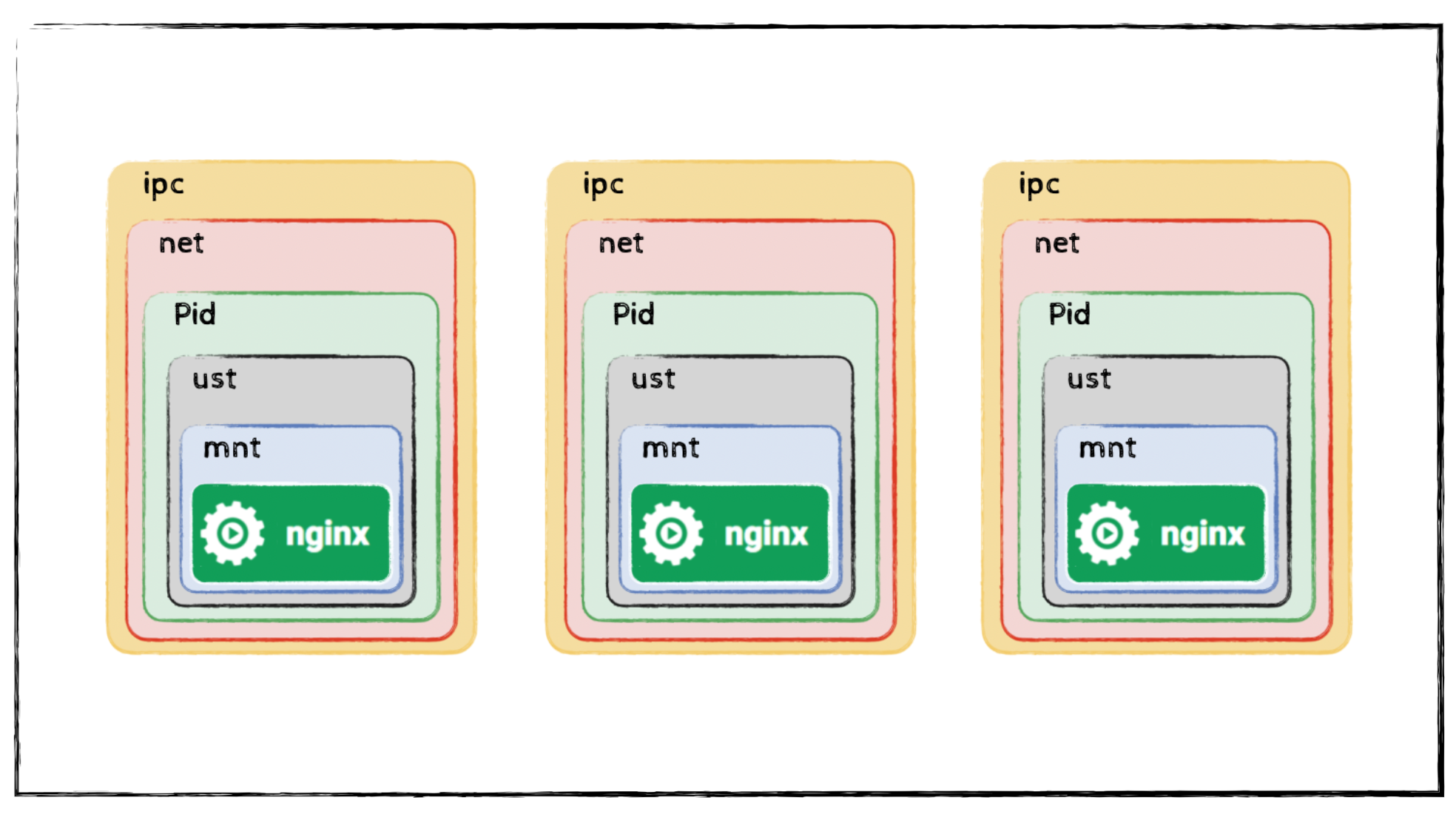
If you run a single application with Docker, Docker automatically creates the necessary namespaces and cgroups. This results in the classic one-application-per-container setup shown below.
Building a Multi-Process “Container”
However, nothing in Linux prevents you from running multiple processes that share the same namespaces. With a few extra parameters, you can start multiple applications that live in the same network, IPC, and PID namespaces and thus behave as if they are running together inside one larger container.
First, start a container running a web server:
1$ podman run -d --ipc=shareable \
2    --name nginx \
3    -v "$(pwd)"/nginx.conf:/etc/nginx/nginx.conf:Z \
4    -p 8080:80 \
5    nginx
Using this nginx.conf:
 1error_log stderr;
 2events { worker_connections 1024;}
 3http {
 4access_log /dev/stdout combined;
 5    server {
 6        listen 80 default_server;
 7        server_name example.com www.example.com;
 8        location / {
 9            proxy_pass http://127.0.0.1:2368;
10        }
11    }
12    server_tokens off;
13}
Now start a second application (Ghost CMS) and attach it to the first container’s namespaces:
1$ podman run -d \
2    --name some-ghost \
3    --net=container:nginx \
4    --ipc=container:nginx \
5    --pid=container:nginx \
6    -e NODE_ENV=development \
7    ghost
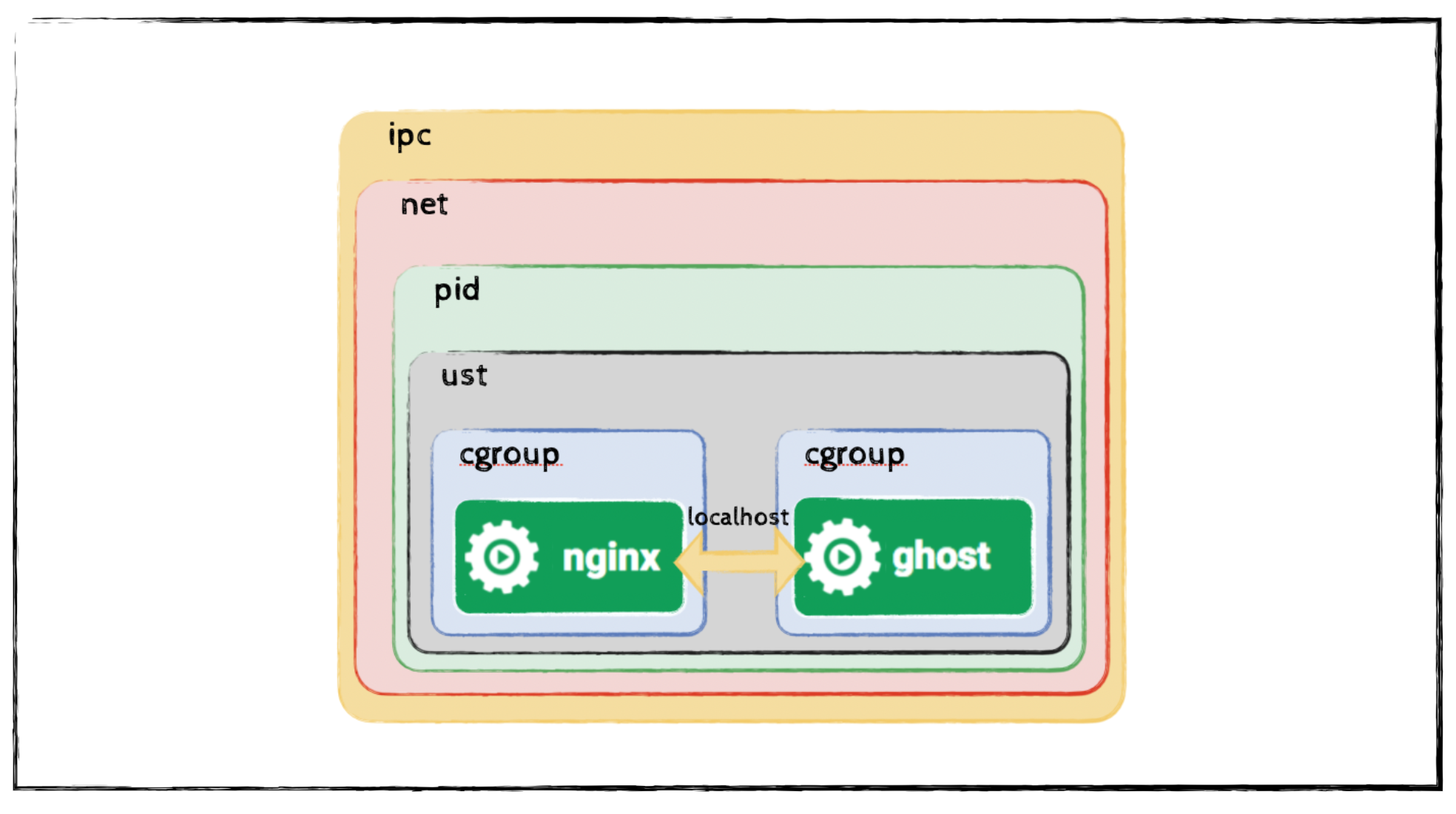
After starting both containers and attaching the second one to the namespaces of the first, you effectively create a multi-process container environment in which both applications share the same network, IPC, and PID namespaces. This setup allows them to communicate over localhost and operate as if they were running inside a single container. The resulting container configuration is shown in the illustration below.
So, What Is a Pod?
With these examples in mind, the concept of a Kubernetes pod becomes much clearer:
A pod is a group of one or more containers that:
- share the same network namespace,
- can communicate via localhost,
- can coordinate via shared IPC
Kubernetes (or more precisely, the container runtime) takes care of creating and wiring these namespaces and cgroups correctly. The pod is therefore a logical wrapper around a set of processes that should run together, much like our multi-process container example—only standardized and automated.
Pods aren’t a Linux primitive. They are a Kubernetes abstraction built on top of Linux primitives.
And that abstraction is what makes Kubernetes work.